\n
\n\n\n \n
\n
\n\nVelocity-Sensitive Backlit Pads
\nThese velocity-sensitive backlit pads deliver the perfect touch for precise drumming and sample playback.
\n\n \n
\n
\n\nHigh-definition OLED Screen Display
\nThe DMK-25Pro has a straightforward panel design and a high-definition OLED display. View arpeggio, velocity, speed, and other functions in real time to make arranging and creating timbre easier.
\n\n \n
\n
\n\nInnovative Wheels
\n4 innovative wheels for greater visual control and comfort when turning, custom mapping to allocate the information you need to control, and 6 transport controllers to improve arrangement efficiency
\n\n \n
\n
\n\nPersonalized Touch Bar With Light Scale
\nYour composition is easier using Pitch/Mod touch mode.
\n\n
\n \n\n

 \n
\n
\n \n\n

 \n
\n
\n \n\n
\nGift Genuine CUBASE Software
\nBuying DMK-25 Pro MIDI keyboard supports genuine Cubase LE、Cubasis、WaveLab LE software, Which provides you with a complete music production experience to help you in your arrangement and creation. Remember to get the course from customer service!
\n\n
\n
\n \n
\n\n
\n\n\n
\n\n  \n
\n
\n \n \n
\n \n Claim Your FREE DAWs\n
\n \n Buying Donner DMK25-Pro gets you free melodies code, Click here to claim your free melody after placing your order, or contact our customer service team directly. \n
\n Frequently Asked Questions:
\n\nQ: How to get the activation code of the CUBASE or get free courses?
A: Please ask Donner Online Customer Team (UK) through the Product Order Page!
Q: Are the velocity of the key sensitive?
A: Yes, the keyboard on our Donner DMK25 Pro midi controller is velocity sensitive!
Q: Is it compatible with the garage band on the iPad?
A: Yes, our midi keyboard can compatible with garage bands on ipad.
Q: Do the keys press smoothly? Are the keys actually \"semi-weighted\" or \"like semi-weighted\" synth keys?
A: Not weighted keyboard, but these keys are much better than the cheap non-weighted keyboards. More control here on Donner DMK 25 Pro midi keyboard without a doubt.
\n\n\nA: Please ask Donner Online Customer Team (UK) through the Product Order Page!
Q: Are the velocity of the key sensitive?
A: Yes, the keyboard on our Donner DMK25 Pro midi controller is velocity sensitive!
Q: Is it compatible with the garage band on the iPad?
A: Yes, our midi keyboard can compatible with garage bands on ipad.
Q: Do the keys press smoothly? Are the keys actually \"semi-weighted\" or \"like semi-weighted\" synth keys?
A: Not weighted keyboard, but these keys are much better than the cheap non-weighted keyboards. More control here on Donner DMK 25 Pro midi keyboard without a doubt.
\n
Q: How to connect a sustain pedal?
A: Currently our midi keyboards do not support external sustain pedals, but you can turn on sustain by pressing the key combination bank k+bank s, and turn off sustain by pressing bank k+bank s again.\n
\n","image":["/images/donnermusichq.shop/images/product/donner-dmk-25-pro-midi-keyboard-1.jpg","/images/donnermusichq.shop/images/product/donner-dmk-25-pro-midi-keyboard-2.jpg","/images/donnermusichq.shop/images/product/donner-dmk-25-pro-midi-keyboard-3.jpg","/images/donnermusichq.shop/images/product/donner-dmk-25-pro-midi-keyboard-4.jpg","/images/donnermusichq.shop/images/product/donner-dmk-25-pro-midi-keyboard-5.jpg","/images/donnermusichq.shop/images/product/donner-dmk-25-pro-midi-keyboard-6.jpg","/images/donnermusichq.shop/images/product/donner-dmk-25-pro-midi-keyboard-7.jpg","/images/donnermusichq.shop/images/product/donner-dmk-25-pro-midi-keyboard-8.jpg","/images/donnermusichq.shop/images/product/donner-dmk-25-pro-midi-keyboard-9.jpg"],"sku":"donner-dmk-25-pro-midi-keyboard","brand":{"@type":"Brand","name":"Donner Music UK"},"offers":{"@type":"AggregateOffer","lowPrice":40.02,"highPrice":40.02,"priceCurrency":"USD","availability":"https://schema.org/InStock","url":"https://donnermusichq.shop/products/donner-dmk-25-pro-midi-keyboard","offerCount":1}}Q: How to connect a sustain pedal?
A: Currently our midi keyboards do not support external sustain pedals, but you can turn on sustain by pressing the key combination bank k+bank s, and turn off sustain by pressing bank k+bank s again.\n
1 / 9
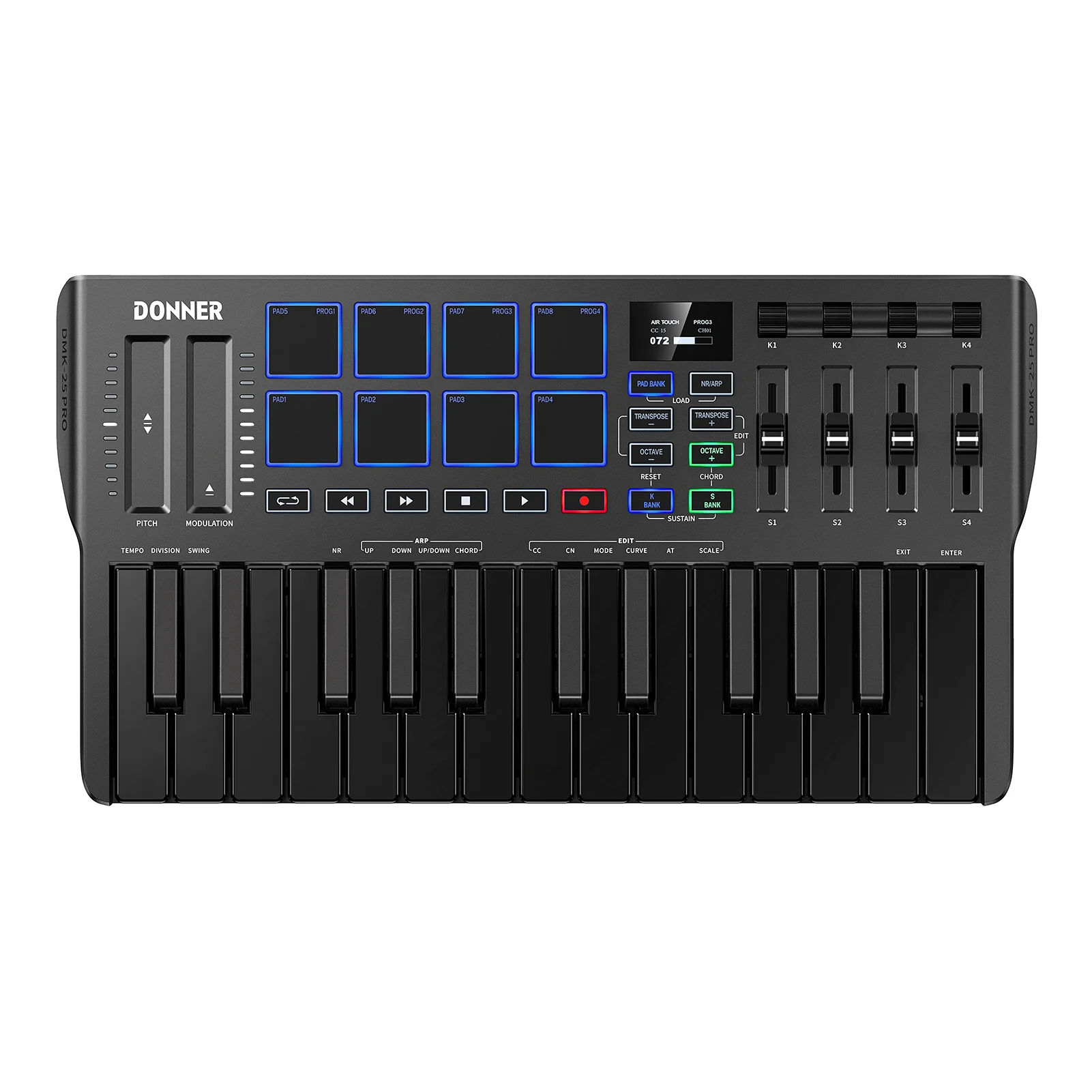
Donner DMK-25 PRO MIDI Keyboard


DMK-25 Pro New Upgrade
One mastering processor New hardware upgrade: Personalized Touch Bar With Light Scale/Innovative Wheels/High-definition OLED screen display.

Velocity-Sensitive Backlit Pads
These velocity-sensitive backlit pads deliver the perfect touch for precise drumming and sample playback.

High-definition OLED Screen Display
The DMK-25Pro has a straightforward panel design and a high-definition OLED display. View arpeggio, velocity, speed, and other functions in real time to make arranging and creating timbre easier.

Innovative Wheels
4 innovative wheels for greater visual control and comfort when turning, custom mapping to allocate the information you need to control, and 6 transport controllers to improve arrangement efficiency

Personalized Touch Bar With Light Scale
Your composition is easier using Pitch/Mod touch mode.


Gift Genuine CUBASE Software
Buying DMK-25 Pro MIDI keyboard supports genuine Cubase LE、Cubasis、WaveLab LE software, Which provides you with a complete music production experience to help you in your arrangement and creation. Remember to get the course from customer service!

Claim Your FREE DAWs
Buying Donner DMK25-Pro gets you free melodies code, Click here to claim your free melody after placing your order, or contact our customer service team directly.
Frequently Asked Questions:
Q: How to get the activation code of the CUBASE or get free courses?
A: Please ask Donner Online Customer Team (UK) through the Product Order Page!
Q: Are the velocity of the key sensitive?
A: Yes, the keyboard on our Donner DMK25 Pro midi controller is velocity sensitive!
Q: Is it compatible with the garage band on the iPad?
A: Yes, our midi keyboard can compatible with garage bands on ipad.
Q: Do the keys press smoothly? Are the keys actually "semi-weighted" or "like semi-weighted" synth keys?
A: Not weighted keyboard, but these keys are much better than the cheap non-weighted keyboards. More control here on Donner DMK 25 Pro midi keyboard without a doubt.
A: Please ask Donner Online Customer Team (UK) through the Product Order Page!
Q: Are the velocity of the key sensitive?
A: Yes, the keyboard on our Donner DMK25 Pro midi controller is velocity sensitive!
Q: Is it compatible with the garage band on the iPad?
A: Yes, our midi keyboard can compatible with garage bands on ipad.
Q: Do the keys press smoothly? Are the keys actually "semi-weighted" or "like semi-weighted" synth keys?
A: Not weighted keyboard, but these keys are much better than the cheap non-weighted keyboards. More control here on Donner DMK 25 Pro midi keyboard without a doubt.
Q: How to connect a sustain pedal?
A: Currently our midi keyboards do not support external sustain pedals, but you can turn on sustain by pressing the key combination bank k+bank s, and turn off sustain by pressing bank k+bank s again.
$40.02
Original: $133.39
-70%Donner DMK-25 PRO MIDI Keyboard—
$133.39
$40.02Product Information
Product Information
Shipping & Returns
Shipping & Returns
Description
DMK-25 Pro New Upgrade
One mastering processor New hardware upgrade: Personalized Touch Bar With Light Scale/Innovative Wheels/High-definition OLED screen display.
Velocity-Sensitive Backlit Pads
These velocity-sensitive backlit pads deliver the perfect touch for precise drumming and sample playback.
High-definition OLED Screen Display
The DMK-25Pro has a straightforward panel design and a high-definition OLED display. View arpeggio, velocity, speed, and other functions in real time to make arranging and creating timbre easier.
Innovative Wheels
4 innovative wheels for greater visual control and comfort when turning, custom mapping to allocate the information you need to control, and 6 transport controllers to improve arrangement efficiency
Personalized Touch Bar With Light Scale
Your composition is easier using Pitch/Mod touch mode.
Gift Genuine CUBASE Software
Buying DMK-25 Pro MIDI keyboard supports genuine Cubase LE、Cubasis、WaveLab LE software, Which provides you with a complete music production experience to help you in your arrangement and creation. Remember to get the course from customer service!
Claim Your FREE DAWs
Buying Donner DMK25-Pro gets you free melodies code, Click here to claim your free melody after placing your order, or contact our customer service team directly.
Frequently Asked Questions:
Q: How to get the activation code of the CUBASE or get free courses?
A: Please ask Donner Online Customer Team (UK) through the Product Order Page!
Q: Are the velocity of the key sensitive?
A: Yes, the keyboard on our Donner DMK25 Pro midi controller is velocity sensitive!
Q: Is it compatible with the garage band on the iPad?
A: Yes, our midi keyboard can compatible with garage bands on ipad.
Q: Do the keys press smoothly? Are the keys actually "semi-weighted" or "like semi-weighted" synth keys?
A: Not weighted keyboard, but these keys are much better than the cheap non-weighted keyboards. More control here on Donner DMK 25 Pro midi keyboard without a doubt.
A: Please ask Donner Online Customer Team (UK) through the Product Order Page!
Q: Are the velocity of the key sensitive?
A: Yes, the keyboard on our Donner DMK25 Pro midi controller is velocity sensitive!
Q: Is it compatible with the garage band on the iPad?
A: Yes, our midi keyboard can compatible with garage bands on ipad.
Q: Do the keys press smoothly? Are the keys actually "semi-weighted" or "like semi-weighted" synth keys?
A: Not weighted keyboard, but these keys are much better than the cheap non-weighted keyboards. More control here on Donner DMK 25 Pro midi keyboard without a doubt.
Q: How to connect a sustain pedal?
A: Currently our midi keyboards do not support external sustain pedals, but you can turn on sustain by pressing the key combination bank k+bank s, and turn off sustain by pressing bank k+bank s again.